
Bay Alarm Medical Review 2026
We put this popular medical alert system to the test—see how these devices performed in our 2026 Bay Alarm review.

- Bay Alarm Medical alert systems stand out for their excellent customer service and 31-second response time.
- Device prices range from $24.95–$39.95 per month.
- Bay Alarm's friendly response center staff earned the brand the title of Best Customer Service in our roundup of the best medical alert devices.
- Bay Alarm Medical offers home, mobile, and smartwatch options, giving shoppers more flexibility based on lifestyle and coverage needs.
- Bay Alarm Medical’s mobile devices include GPS tracking and caregiver alerts, but shoppers should compare battery life before choosing a model: the SOS Smartwatch lasts only six to eight hours, while the SOS All-In-One 2 lasts up to 72 hours.
- All Bay Alarm Medical devices offer optional fall detection.
At NCOA, we take the time to research, test, and recommend products that aim to help you live a healthier life. We’ve spent more than 3,000 hours researching medical alert systems to give you the most accurate product reviews. To find the best medical alert systems, we:
- Consulted with doctors and licensed adult caregivers who specialize in working with older adults
- Put more than 35 devices through a series of 16 different tests at our in-house lab
- Mystery shopped more than 15 brands
- Surveyed more than 1,000 medical alert system users and caregivers
- Interviewed experts on older adults falls risk
- Worked with older adults to test medical alert systems and get their opinion
- Read thousands of verified customer reviews
We’re constantly testing new medical alert systems to give you the most accurate and up-to-date recommendations. Read more about our medical alert system review methodology.
Bay Alarm Medical is a user-focused company that offers exceptional customer service and highly customizable devices. Our testers rated their interactions with Bay Alarm’s response center staff as a 10/10, earning it Best Customer Service in our guide to the best medical alert systems. With home, mobile, and smartwatch options available, Bay Alarm Medical offers a variety of devices to fit your needs and lifestyle.
In this Bay Alarm Medical review, we’ll outline the different features of each type of device, what our testers thought of their experiences with Bay Alarm, and how to decide which medical alert system is right for you.
Bay Alarm Medical
Many styles and device types to choose from, including on-the-go devices with long battery life
Why we recommend Bay Alarm Medical
We recommend Bay Alarm Medical for its focus on a positive user experience. They had an excellent average response time of 31 seconds. This meant that when we pressed the help button, it took about 30 seconds to get someone on the line to answer our call. Asking for help can be difficult, but their friendly and professional emergency response center staff make it easier. They never made us feel awkward or embarrassed for calling, even when we were testing our devices many times in a row. When we called the customer service line acting as a potential user, we were impressed by their empathy.
Because the most effective medical alert system is one that you wear consistently, we think it’s very important that the device you own is one you’ll want to use.1 If you are nervous about speaking to unhelpful or unfriendly monitoring center staff, then you’ll be less likely to push the button when you need to. A large majority (93%) of Bay Alarm users in our survey said their interactions with customer service and/or monitoring center staff were “very positive and helpful.” That’s 12% higher than the average of all companies (81%). No other company in our survey had such high customer satisfaction.
We also like that Bay Alarm Medical has a separate customer support line that’s open seven days a week. Only one other medical alert company we’ve reviewed (Medical Guardian) offers this.
And Bay Alarm Medical offers a large range of customizable wristband options and special button coverings called Bella Buttons that turn a necklace-style button into jewelry. Because research has shown that many adults are reluctant to wear medical alert devices because of their clinical appearance, we like that Bay Alarm Medical provides the opportunity to personalize your device into something more discreet.2
Bay Alarm Medical devices compared
| Comparison Features | ||||
|---|---|---|---|---|
| Max. battery life (hours) | 32-hour backup battery |
36 |
8 |
72 |
| Fall detection? | Yes |
Yes |
Yes |
Yes |
| GPS tracking | No |
Yes |
Yes |
Yes |
| Standout features | Only at-home device |
Small, discreet device |
Smartwatch with touch screen |
Works as both at-home and GPS device |
Bay Alarm Medical device reviews
SOS Home: The affordable at-home model
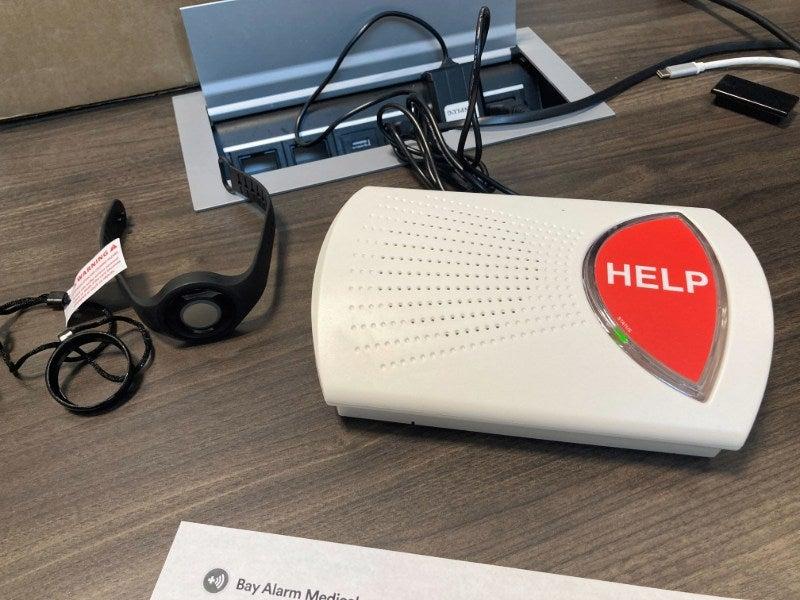
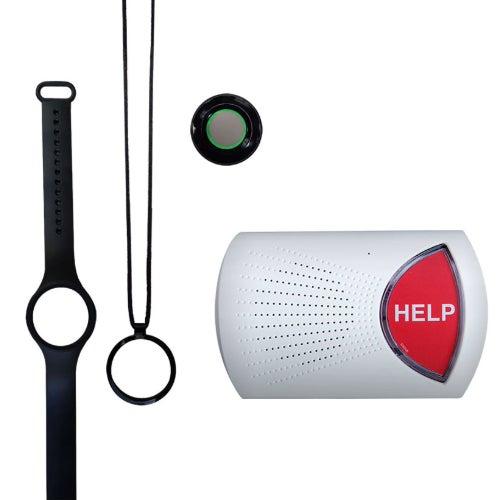
The SOS Home is Bay Alarm’s most affordable medical alert system model. It has an excellent average response time of 31 seconds and detected 3/3 test falls. The SOS Home is a great option for someone who spends most of their time at home.
SOS Home
- Learn about the best medical alert systems
- Uses either landline or cellular connection
- Covers 1,000 feet, which is about three football fields
- Most affordable system on this list
- Device type: At-home
- Fall detection: Yes with the cellular option
- Max. battery life: 32-hour backup battery
- GPS tracking: No
- Caregiver alerts: Yes
- Connection type: Landline or LTE
Pros
- Can purchase Bella Charms for a more discreet device
- No device fee
- Longer device range than most home devices
Cons
- $30 device fee and $10 monthly fee to add fall detection
- No volume control on base device
- Only for in-home use
SOS Micro: The discreet one-button watch option
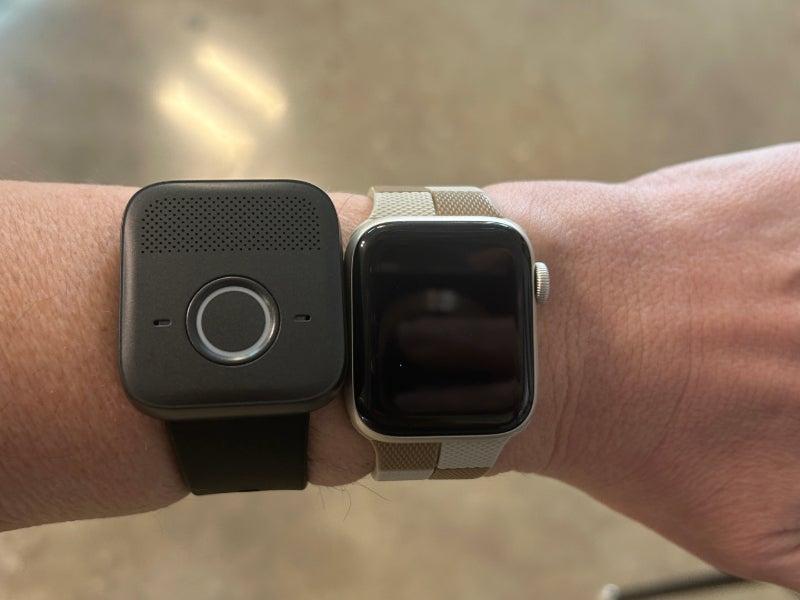
About the size of a traditional watch, the SOS Micro is a discreet medical alert device that’s great for people who spend time out of the house. It includes real-time location tracking and five different band options that make it look like a regular watch.
SOS Micro
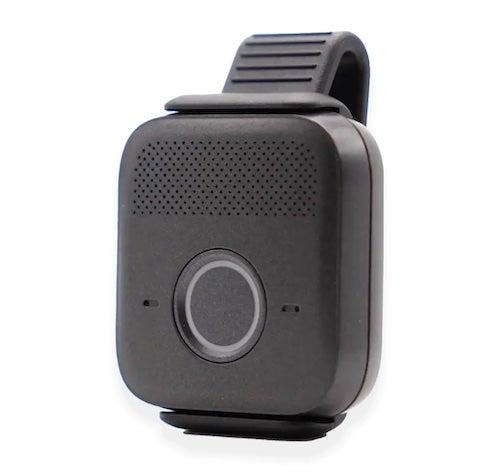
- Compact and discreet size
- Customizable bands
- User-friendly interface
- Device type: GPS
- Fall detection: Yes
- Max. battery life: 36 hours
- GPS tracking: Yes
- Caregiver alerts: Yes
- Connection type: LTE
Pros
- Device can be worn as a necklace or bracelet
- Caregiver app included
- No need for a separate device if you add fall detection
Cons
- $149 equipment fee
- Button can dislodge easily from holder
- No separate testing mode
SOS Smartwatch: The feature-full watch option
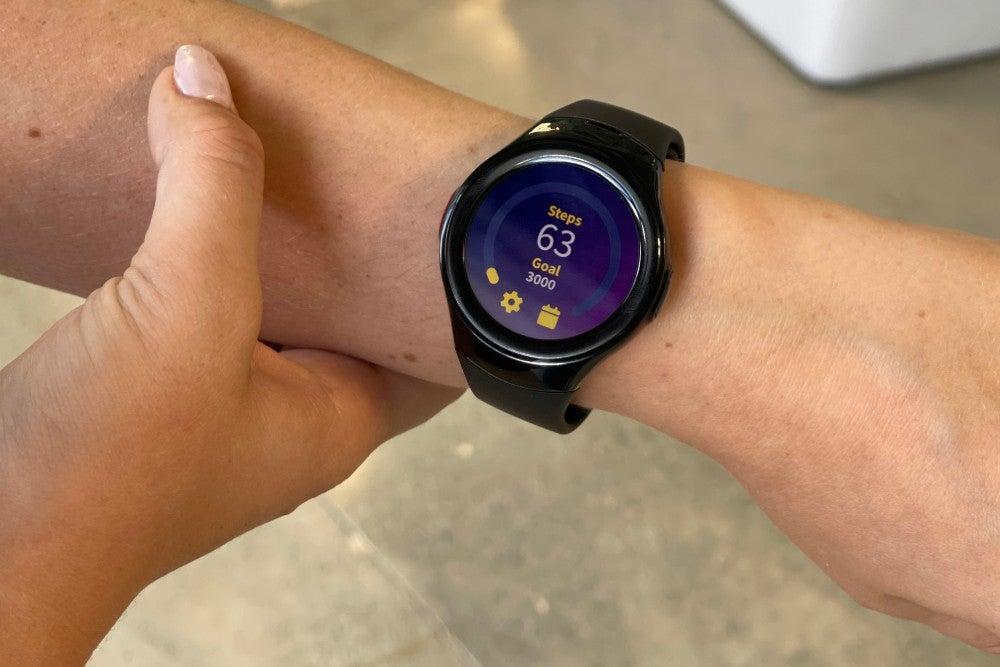
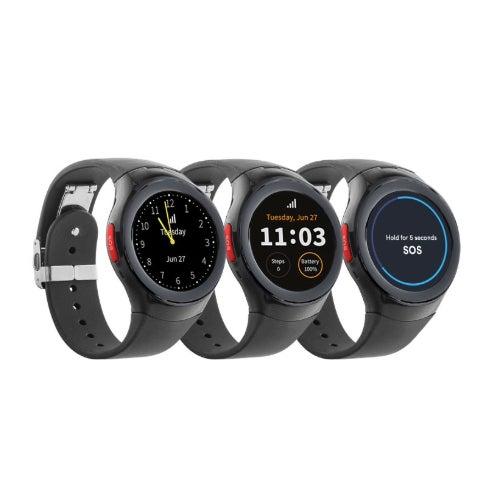
The SOS Smartwatch is similar to the SOS Micro, but it has a touchscreen with additional apps, rather than just a button and a speaker. With GPS tracking and optional automatic fall detection, the SOS Smartwatch is a great choice for someone seeking greater flexibility and features in a medical alert device.
SOS Smartwatch
- Learn about the best medical alert watches
- Step counter, time, and local weather features
- No smartphone required for use, unlike other smartwatches
- Sleek smartwatch look
- Device type: GPS smartwatch
- Fall detection: Yes
- Max. battery life: 8 hours
- GPS tracking: Yes
- Caregiver alerts: Yes
- Connection type: LTE
Pros
- Doesn’t look like a medical alert device
- Includes a step counter and weather app
- No smartphone necessary
Cons
- $199 equipment fee
- Shorter battery life
- Most expensive Bay Alarm option
SOS All-In-One 2: The multipurpose GPS device
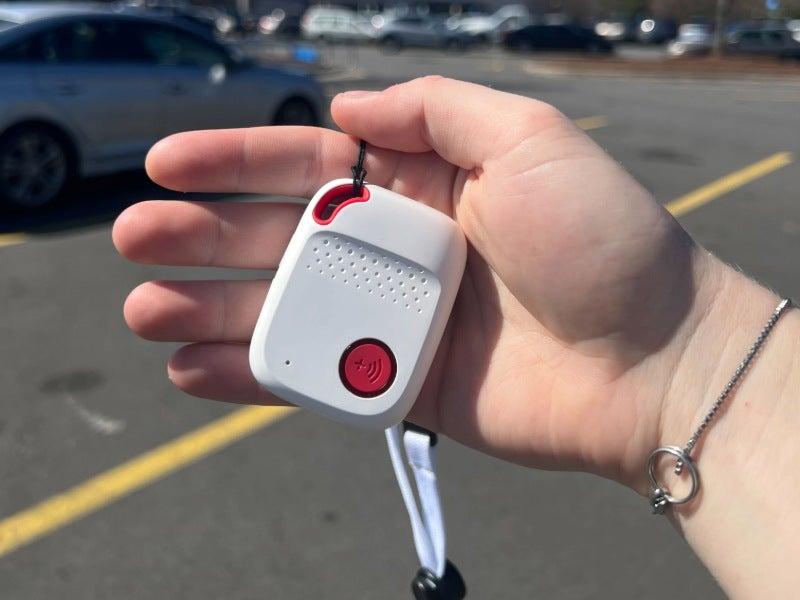
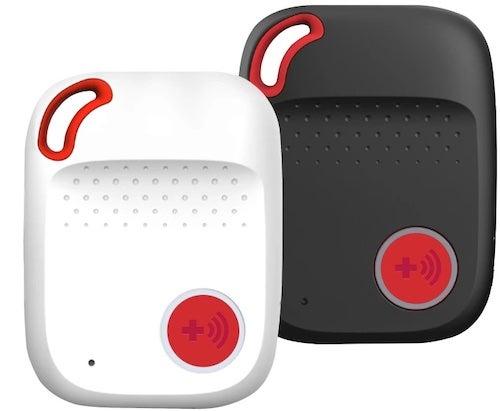
The SOS All-In-One 2 combines features of the SOS Home and Micro. This mobile device has its own base and a wearable button you can take into the shower or sleep with. With the brand’s longest battery life (72 hours) and the flexibility to wear either the unit or button, this option is great for people who want their devices to address a variety of needs.
SOS All-In-One 2
- Learn about the best medical alert systems with fall detection
- Mobile unit and a wearable button
- Longest battery life (72 hours) from Bay Alarm Medical
- Works as both an in-home and mobile unit
- Device type: GPS
- Fall detection: Yes
- Max. battery life: 72 hours
- GPS tracking: Yes
- Caregiver alerts: Yes
- Connection type: LTE
Pros
- Designed for use at home or on the go
- Includes a separate wearable button
- Longest battery life of Bay Alarm devices
Cons
- $149 equipment fee
- Bulky design isn’t discreet
- Need to call customer service to adjust volume
How we tested Bay Alarm Medical devices
To identify the best medical alert systems, we combine research, expert input, and testing. We survey and host focus groups with older adults who use medical alert systems, review verified customer feedback, and consult health care professionals to understand how falls, chronic conditions, and mobility needs affect device use.
We use those insights to develop a testing methodology that includes more than 60 data points. Our team tests popular, well-reviewed systems across six categories: fall detection, GPS tracking, affordability, features, user experience, customer service, and brand reputation. This process helps us evaluate which medical alert systems offer the strongest mix of reliability, value, and accessibility.
Bay Alarm Medical costs and purchasing options
Bay Alarm Medical’s devices cost anywhere from $27.95–$39.95 per month. The SOS Micro, All-In-One 2, and Smartwatch all have one-time equipment fees. Some additional features include:
- Fall detection: Costs $10 per month. Fall detection technology senses if you experience a fall and calls the emergency response center, even if you can’t press the button yourself. Check out our story on the best medical alert systems with fall detection to learn more.
- Lockbox: Costs $30. A lockbox holds a code-protected key to your house that emergency responders can use to enter without breaking your door or window.
- Wall buttons: Costs $35 each or $130 for four (a $10 discount). You can mount wall buttons low to the ground in high fall risk places like the bathroom or by the bed.
Bay Alarm Medical costs
| Comparison Features | SOS Home |
SOS Micro |
SOS Smartwatch |
SOS All-In-One 2 |
|---|---|---|---|---|
| Starting monthly cost | $27.95 |
$34.95 |
$39.95 |
$34.95 |
| One-time equipment fee | $0 |
$149 |
$199 |
$149 |
| Fall detection | $10/month |
$10/month |
$10/month |
$10/month |
How to save money on Bay Alarm Medical devices
One of the simplest ways to save money on a Bay Alarm Medical device is to choose the annual subscription plan instead of the monthly. If you do so, you’ll get an additional free month and free shipping.
And if you have a spouse or other family member in your home who could benefit from a medical alert device, Bay Alarm Medical lets you purchase an additional button without paying for a separate subscription.
Medicare or Medicaid typically don’t cover medical alert devices, but you might be able to use your health savings account or flexible spending account to pay for one. If you have private insurance, you might have coverage; double-check your insurance policy before purchasing anything.
Bay Alarm Medical accessories and options
Bay Alarm Medical has one of the widest ranges of accessories and options for customers to choose from. Some of these medical alert system features and accessories include:
- Bella Bands and Charms: Bella Bands and Charms allow you to customize the appearance of your wearable button. The charms cover the button, making it look like a regular necklace.
- Caregiver tracking: Caregiver tracking allows designated contacts to see your real-time location in case you need help, and receive alerts when your button is pushed.
- Vial of Life: This waterproof container includes forms you can fill out with your emergency medical information and history for responders to use if you’re unable to communicate.
The Bay Alarm Medical user experience
Our testers found Bay Alarm Medical’s devices to be user-friendly. They thought installation was simple and clear, with a “plug-and-play” setup that means you only have to find a good outlet to charge your devices.
Once our testers were wearing their devices, they liked how easy it was to switch between the different types of wear—either necklace, wristband, or belt clip—but they did find them to be slightly clinical. “It's comfortable and the optionality is great, but it's still pretty clear it's a medical alert system,” one tester said.
We do think that the option to add a Bella Charm over the necklace or a Bella Band to make the wristband look more like a watch is a good alternative for people reluctant to wear a medical alert device.
When we tested the device, we were impressed by what we considered excellent customer service from the Bay Alarm Medical response staff. They were friendly, warm, and professional. “They're very cheerful and kind,” one tester said. “I like how they tell me their name and say mine.”
When we called the customer service line, the person introduced themselves and walked us through the different device options without acting pushy or salesy. They seemed genuinely concerned about our well-being. When we told the customer service representative we were looking for a device for our mother who recently fell, the representative sounded compassionate and engaged. The representative asked us several questions about our mother. When they asked us whether she still drives, we said, “Yes,” and the representative responded, “Go her!” We really appreciated the personal touch. It felt like the representative was a partner helping to care for our mother, not just trying to make a sale.
Bay Alarm Medical’s customer service and warranty
- Warranty: The standard warranty covers manufacturer defects or “wear and tear.” You can purchase a protection plan for your device for issues like loss or theft for $2.95–$4.95/month.
- Trial period: 15 days
- Customer service:
- Phone: 877-522-9633, Monday through Friday, 6 a.m. to 6 p.m. PT; Saturday and Sunday, 8 a.m. to 12 p.m. PT and 12:30 p.m. to 4:30 p.m. PT
- Email: cs@bayalarmmedical.com
- Chat: Chat on website, Monday through Friday from 7 a.m. to 3:30 pm PT, and Saturday and Sunday from 8 a.m. to 4:30 p.m. PT
Who should consider a Bay Alarm Medical device
We think that Bay Alarm Medical devices are a great choice for people who might be anxious about speaking with a medical professional, especially during a stressful event like a medical emergency. Their warm and friendly staff encourage communication and can reassure someone who is upset or afraid.
When our tester called the Bay Alarm Medical line posing as a potential customer, the representative asked thoughtful questions, followed up on the potential user’s needs and goals, and was kind and supportive. And their customer support line is open seven days a week, so you don’t have to wait all weekend to have a question answered.
If you don’t like speaking to medical professionals—particularly over the phone—because you’ve had a negative experience, you might be hesitant to push the help button, even if you really need to. Choosing a device from Bay Alarm Medical can ease those fears and help you feel more empowered to take the steps needed to get help.
We also like that Bay Alarm Medical offers different ways to customize or dress up a device to look more like jewelry. And because they offer so many different models, it’s easier for you to find the exact type and appearance that best fits your lifestyle.
One drawback is that Bay Alarm Medical has some additional fees we wish weren’t included. They charge one-time equipment fees ($30–$199.95) for almost all of their devices. A lockbox costs $30, which is a little more expensive than other brands. And free shipping is only for a few plans. Shipping tends to be free with other brands that offer annual subscriptions. Other companies like MobileHelp and Alert1 don’t charge device fees, and many of their plans include a free lockbox and shipping. Check out our comparison of Bay Alarm Medical vs Lifestation medical alert systems for a one to one comparison of the differences between the brands.
Before choosing a specific device, ask yourself these questions:
- What goals or needs are you hoping to achieve with a medical alert device?
- How would you feel most comfortable wearing a device?
- Do you tend to stay at home or leave the house frequently?
Frequently asked questions
How much does Bay Alarm Medical cost?
Bay Alarm Medical has a monthly cost range of $27.95–$39.95, with additional equipment fees or add-on features.
How does Bay Alarm Medical work?
Bay Alarm Medical works by connecting the user to a 24/7/365 emergency response center when the help button is pressed or a fall is registered. Then, the response staff communicates with emergency responders.
Will Medicare pay for Bay Alarm Medical?
No, Medicare does not cover Bay Alarm Medical or any other medical alert devices.
Is Bay Alarm Medical worth it?
Yes, Bay Alarm Medical is worth it because of the security, independence, and flexibility a medical alert system provides to someone who has a fall risk or might need emergency medical help.
Does Bay Alarm Medical require a contract?
No, Bay Alarm Medical does not require a contract. You can cancel your subscription at any time.
What cell service does Bay Alarm Medical use?
Bay Alarm Medical uses either AT&T or Verizon, but you do not need to have a cellphone contract.
Questions? Email us at reviewsteam@ncoa.org