

Lifeline Medical Alert System Review (Formerly Philips Lifeline) 2026
Lifeline has five medical alert devices. We break down the cost, comfort, and what happens once you use it to call for help.

- Lifeline’s medical alert wearables aren’t heavy, but some are more discreet than others.
- Lifeline products cost between $27.95–$44.95 per month.
- Most Lifeline medical alert products have a $99 setup fee.
- Lifeline was acquired by Connect America in 2021. Philips maintains equity in the company.
At NCOA, we take the time to research, test, and recommend products that aim to help you live a healthier life. We’ve spent more than 3,000 hours researching medical alert systems to give you the most accurate product reviews. To find the best medical alert systems, we:
- Consulted with doctors and licensed adult caregivers who specialize in working with older adults
- Put more than 35 devices through a series of 16 different tests at our in-house lab
- Mystery shopped more than 15 brands
- Surveyed more than 1,000 medical alert system users and caregivers
- Interviewed experts on older adults falls risk
- Worked with older adults to test medical alert systems and get their opinion
- Read thousands of verified customer reviews
We’re constantly testing new medical alert systems to give you the most accurate and up-to-date recommendations. Read more about our medical alert system review methodology.
Lifeline is one of the most widely recognized makers of medical alert systems. When we surveyed older adults about their medical alert systems, Lifeline was the third-most-reported brand our respondents owned.1 This Lifeline review will dig into costs, comfort, and who Lifeline’s medical alert products work best for.
Lifeline, once called Philips Lifeline, was acquired by Connect America in 2021. But Philips still maintains a stake in Lifeline. So if you are looking for information about the Philips Lifeline, you’ve come to the right place. Read on for what our testers thought when we tried the brand's medical alert systems.
Who Lifeline is best for
Lifeline’s landline offering makes it a good option for people who live in rural areas that lack cell service. Many medical alert systems rely on cellular connection only. Lifeline is one of only a handful of providers who offer a landline. If you’re shopping for Lifeline for someone else, our guide on how to talk about medical alert systems can help you navigate this sometimes sensitive topic.
Across its devices, Lifeline has many important medical alert system features: monitoring, GPS tracking, and two-way talk. This Lifeline review will break down which of the brand’s medical alert products might be best for your lifestyle. Here’s a brief overview:
- Lifeline HomeSafe Landline: Best for people in rural locations with limited cellular service who don’t often run errands outside the home
- Lifeline HomeSafe Cellular: Best for those who don’t often run errands outside the home
- Lifeline On the Go: Best for people who frequently leave the home and want a wearable medical alert system you can’t easily set off
- Lifeline on the Go Mini: Best for people who want GPS tracking with a quick response time
- Lifeline Smartwatch: Best for anyone looking for a discreet two-way talk help button
Comparing Lifeline devices
| Comparison Features | ||||
|---|---|---|---|---|
| Max. battery life | 30 backup hours |
30 backup hours |
Up to 4 days (Standard); 24 hours (Mini) |
Up to 3 days |
| Fall detection | $15/mo |
$15/mo |
$15/mo |
$15/mo |
| GPS tracking | No |
No |
Yes |
Yes |
| Standout feature | Landline connection |
Cellular connection |
GPS device |
Smartwatch with touchscreen |
Lifeline reviews
Lifeline HomeSafe Landline
The HomeSafe Landline has a range of 800 feet and comes with a help button you can change out between a wristband or a necklace. It also comes with a free lockbox so first responders can access your home in an emergency (the lockbox holds a spare house key and can be opened using a secure code). With an annual plan, shipping on the HomeSafe Landline console is free. If you opt for the monthly plan, you’ll pay $30 for shipping.
Lifeline HomeSafe Landline
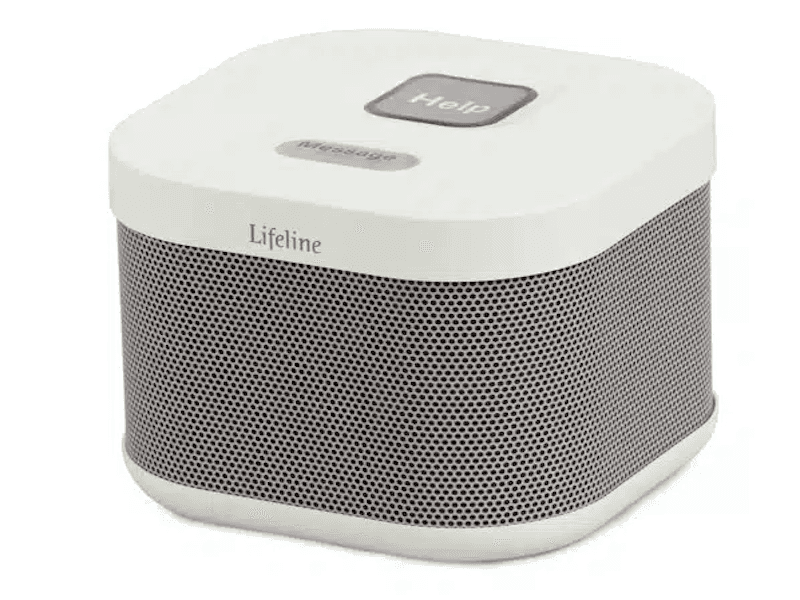
- Dexterity-friendly packaging and controls impressed our testers
- Offers access to speak to a registered nurse as part of add-on
- Fall detection available (with AutoAlert pendant)
- Starting monthly cost: $27.95
- Device type: At-home
- Fall detection: Yes, $15/month
- Max. battery life: 30-hour backup
- GPS tracking: No
- Caregiver alerts: Yes
- Connection type: Landline
Pros
- 30-hour backup battery
- Easy-to-use volume control
- Waterproof help button
Cons
- Short range
- No call cancellation
- Long response time
Lifeline HomeSafe Cellular
Like the HomeSafe Landline, the HomeSafe Cellular comes with an at-home unit and a help button you can move between a wristband and a necklace. With an annual plan, shipping on the HomeSafe Cellular is free. The HomeSafe Cellular costs around $8 more than the HomeSafe Landline. The range on both the HomeSafe Landline and the HomeSafe Cellular is 800 feet.
Lifeline HomeSafe Cellular
- CareCompass add-on connects you to a registered nurse
- Help button comes in wristband and necklace options
- Fall detection available with use of a wearable
- Starting monthly cost: $34.95
- Device type: At-home
- Fall detection: Yes, $15/month
- Max. battery life: 30-hour backup battery
- GPS tracking: No
- Caregiver alerts: Yes
- Connection type: LTE
Pros
- 30-hour backup battery
- Clear cell signal indicator
- Dexterity-friendly packaging and console
Cons
- Short range
- No call cancellation
- Poor audio connection
Lifeline On the Go and On the Go Mini
Lifeline’s On the Go is one of the brand’s mobile GPS offerings, providing you access to one of Lifeline’s Trained Care Specialists beyond the range of your home. It comes in two styles: On the Go and On the Go Mini. Both devices are smaller than a deck of cards. The On the Go is slightly bulkier and can be worn as a necklace or on a belt clip. The On the Go Mini can also be worn as a wristband.
Lifeline On the Go and On the Go Mini
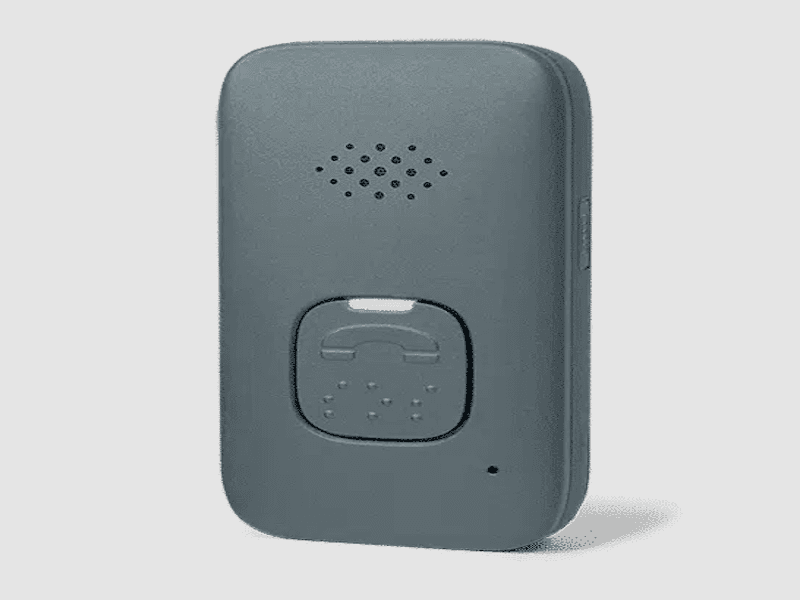
- GPS allows for monitoring support outside your home
- Two-way voice communication
- Lanyard is dexterity-friendly and light
- Starting monthly cost: $44.95
- Device type: GPS
- Fall detection: Yes, $15/month
- Max. battery life: 4 days
- GPS tracking: Yes
- Caregiver alerts: Yes
- Connection type: LTE
Pros
- Fall detection available
- Charges easily
- Adjustable lanyard
- Waterproof
Cons
- Most expensive monthly payment for the Mini
- AI monitoring center liaison may cause delay
- Not very discreet
Lifeline Smartwatch
Lifeline’s smartwatch has the only touchscreen help button in its lineup. Like the On the Go and On the Go Mini, the Lifeline Smartwatch is waterproof and backed by GPS. It also counts your steps and heart rate, functioning as a fitness tracker.
Lifeline Smartwatch
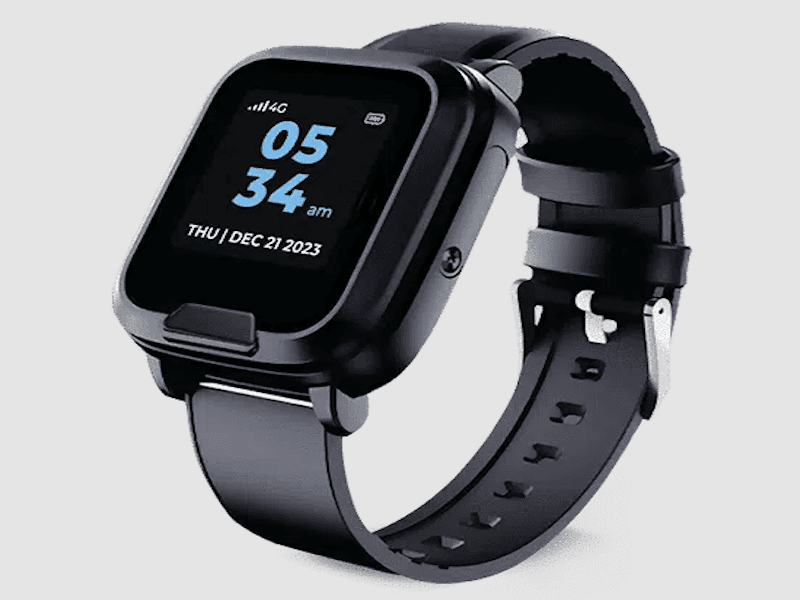
- Waterproof, not just water-resistant
- Two-way voice communication
- The only Lifeline device with call cancellation
- Starting monthly cost: $34.95
- Device type: GPS smartwatch
- Fall detection: Yes, $15/month
- Max. battery life: Up to 3 days
- GPS tracking: Yes
- Caregiver alerts: Yes
- Connection type: LTE
Pros
- Discreet, looks like a normal smartwatch
- Fall detection available as add-on
- Simple setup
Cons
- Charger requires some assembly
- Longer response times than the On the Go
- Biggest activation fee
How much do Lifeline devices cost?
While the $160 activation fee on the Lifeline Smartwatch may cause a little sticker shock, the watch is not the most costly Lifeline help button option. The Lifeline On the Go Mini is the most expensive device in the lineup, costing $44.95/month on the annual plan. All other Lifeline devices are below $40/month.
Fall detection costs an extra $15/month no matter which device you wish to add it to. Subscribing for a monthly plan instead of an annual plan costs $5 more each month. Adding CareCompass, which gives you 24/7 access to a licensed nurse for health questions, costs an extra $15/month. Protection plans on Lifeline devices cost an extra $6.95/month.
| Comparison Features | HomeSafe Landline |
HomeSafe Cellular |
On the Go |
Smartwatch |
|---|---|---|---|---|
| Starting monthly cost | $27.95 |
$34.95 |
$39.95 (Standard); $44.95 (Mini) |
$34.95 |
| Equipment fee | $99.95 setup fee, $29.95 shipping |
$99.95 setup fee, $29.95 shipping, $99 technician installation (optional) |
$99.95 setup fee, $29.95 shipping, $99 technician installation (optional) |
$159.00 device fee, $29.95 shipping, $99 technician installation (optional) |
How to save money on Lifeline devices
The best way to save money on Lifeline devices is to opt for the annual plan instead of monthly billing. Paying once a year will save you about $60. Flexible spending account (FSA) funds can’t be used once you’re retired, and you can’t contribute to a health savings account (HSA) once you’re enrolled in Medicare. So you can only fund your Lifeline purchase through an HSA if Medicare is not your insurer.
Medicare does not cover medical alert systems. Neither do most private insurance providers. But it’s always worth calling your health care insurer to check.
The Lifeline user experience
Using Lifeline requires a little patience. With at least one Lifeline device, an AI secretary answers help button calls before referring you to a monitoring center professional. If you have the Lifeline HomeSafe Landline, your call will likely take twice as long to connect as the LifeLine On the Go or On the Go Mini. In our tests the HomeSafe Landline connected in 60 seconds, when the other Lifeline offerings connected in 32 seconds or less. But a late response is better than no response when it comes to medical alert systems. You might also need to be patient with the garbled audio on the HomeSafe units.
Lifeline’s customer service
Our testers awarded Lifeline customer service a 9.9/10. You can reach Lifeline customer support Monday through Friday. You can contact Lifeline customer service at 877-591-7888 or by using the online contact form.
If you need a full refund, you might not have that option. If you no longer want the service, Lifeline recommends cancelling your subscription and returning your equipment.
Are Lifeline devices right for you?
If you’re fairly mobile outside your home—you go grocery shopping, out to lunch, or on walks—you might want to invest in one of Lifeline’s GPS-enabled devices. If you stay fairly close to home, the HomeSafe Cellular might be the right choice. The audio and response times on the HomeSafe Landline didn’t impress our testers, but they’re still better than having no medical alert system at all. This is especially true for those in rural areas with limited cellular reception.
If you’re concerned about wearing an obvious medical device, the On the Go Mini or the Lifeline Smartwatch are discreet options.
This Lifeline review looked at five different models. Before you choose a Lifeline system, ask yourself:
- Will it bother me that AI answers my call for help before transferring me to a human?
- Can I commit to the additional monthly cost of adding fall detection?
- Do I need clear audio on my at-home unit?
- Do I want the option to cancel my call?
- How subtle do I need my GPS tracker and/or help button to be?
Frequently asked questions
How much does Lifeline cost?
After a startup fee ranging between $99–$159, Lifeline costs between $27.95–$49.95 per month.
How does Lifeline work?
Lifeline works by connecting you to a monitoring center when you press your help button. From there, the monitoring center will contact emergency services and your designated responder. This can be a family member you want alerted.
Does Medicare cover Lifeline?
No, Medicare does not cover Lifeline.
Is Lifeline worth it?
This depends on your needs. The Lifeline product line is wide enough to meet a lot of different needs, whether you have limited mobility, limited cell service, or limited patience.
Can you wear Lifeline in the shower?
Yes. The Lifeline at-home help buttons are waterproof. Just don’t submerge the devices in the bath or the pool.
What carrier does Lifeline use?
Lifeline uses multiple major cellular networks. The HomeSafe Cellular units come with a preinstalled SIM card that functions independently of your personal cell phone provider.
Questions? Email us at reviewsteam@ncoa.org
