
GetSafe Medical Alert Review 2026: Tested by Experts
The GetSafe medical alert system helps you set up protection throughout your home. So you may not need a wearable medical alert system.
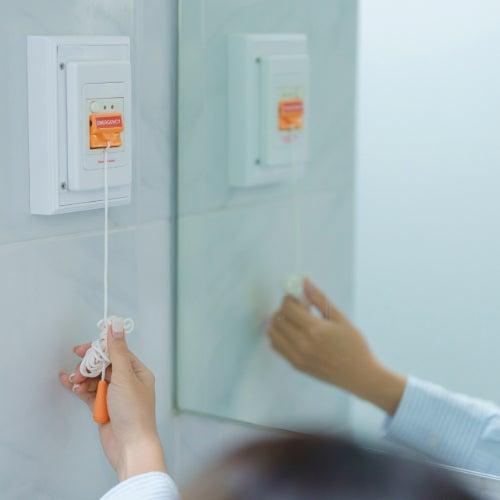
- GetSafe stands out among medical alert systems for its voice-activated wall buttons and in-home protection that does not rely only on a wearable.
- The GetSafe medical alert systems in this review cost around $399–$513 annually.
- GetSafe may be a good fit for those who want fast access to emergency help indoors, where most older adult falls take place.
At NCOA, we take the time to research, test, and recommend products that aim to help you live a healthier life. We’ve spent more than 3,000 hours researching medical alert systems to give you the most accurate product reviews. To find the best medical alert systems, we:
- Consulted with doctors and licensed adult caregivers who specialize in working with older adults
- Put more than 35 devices through a series of 16 different tests at our in-house lab
- Mystery shopped more than 15 brands
- Surveyed more than 1,000 medical alert system users and caregivers
- Interviewed experts on older adults falls risk
- Worked with older adults to test medical alert systems and get their opinion
- Read thousands of verified customer reviews
We’re constantly testing new medical alert systems to give you the most accurate and up-to-date recommendations. Read more about our medical alert system review methodology.
GetSafe, a Bay Alarm company, designed its medical alert system (MAS) so users do not have to rely on a necklace. When asked, 7% of our survey respondents said they don’t like wearing their medical alert system because it makes them “feel old,” while another 4% said they “don’t like how it feels to wear.”1
GetSafe offers a network of help buttons, two-way speakers, and voice activation that your home can wear instead. The company's motto is “free yourself from lanyards and wristbands.” GetSafe prides itself on being an MAS “designed to work around you, not on you.”
Many of our best medical alert systems base pricing on coverage in and outside the home. But GetSafe’s options revolve solely around home coverage—how many rooms you want monitoring protection in. This GetSafe medical alert review will cover the differences between GetSafe plans, how fall detection works in a GetSafe system, and the pros and cons of an MAS you can’t wear.
GetSafe Medical Alert System
- Simple setup for Control Panel
- Multiple help button styles
- Optional lanyard
Why we recommend GetSafe
We recommend GetSafe for people who don’t want a wearable medical alert system. This brand may also work well for folks who forget to put on wearables, like 9% of our survey respondents.1 Instead of a wearable help button, GetSafe’s medical alert system is voice- and touch-activated. To activate your GetSafe help button with your voice, all you need to do is say “Call 911, call 911.” In the training video on the homepage, GetSafe instructs users to say the phrase twice.
The GetSafe system is designed for people who don’t need monitoring outside of their home. Depending on your lifestyle, indoor-only could be the right amount of coverage. A study of older adults admitted to the emergency department after a fall found that indoor falls are more common than outdoor falls.2
To be wearable-free, GetSafe offers no GPS options. But if you’re worried the included buttons could leave a blind spot between rooms, GetSafe lets you purchase a lanyard help button (similar to the Medical Alert lanyard button) and add fall detection to it.
Comparing GetSafe packages
All of the help buttons connect to the Control Panel as the central “hub.” The main difference between GetSafe plans is the number of buttons you wish to connect. GetSafe advertises its coverage tiers as room-based, but the help buttons are what offer protection in those rooms.
| Comparison Features | |||
|---|---|---|---|
| Max. battery life* | 32 hours |
32 hours |
32 hours |
| Fall detection | Yes |
Yes |
Yes |
| GPS tracking | No |
No |
No |
| Coverage | 1 room |
3 rooms |
5 rooms |
*GetSafe is designed to remain plugged in, so this is the battery backup life in case of power failure
GetSafe reviews
GetSafe Starter: Two-Way Voice Activation for Small Spaces
The Starter is the base plan and comes with the Control Panel and one voice-activated wall button with a pull-cord. Pressing or pulling the cord on this button alerts a 24-hour monitoring center. GetSafe’s price tiers differ only in the amount of hardware included. The more you pay, the more help buttons you get as part of your plan. That said, you can pay to add buttons to any plan during checkout—they just won’t arrive connected to the hub.
GetSafe Starter
- Voice-activated
- User-friendly pull cord
- Helpful monitoring center, according to our testers
- Device type: At-home
- Fall detection: Yes
- Max. battery life: 32 hours if disconnected from power source
- GPS tracking: No
- Caregiver alerts: Yes, dispatchers will contact
- Connection type: Landline or LTE (model dependent)
Pros
- One voice-activated wall button
- Multiple ways to call for help
- 24/7 monitoring
Cons
- More wall buttons cost extra
- Supports one single room
- No call cancellation
Customizing your GetSafe Starter Medical Alert
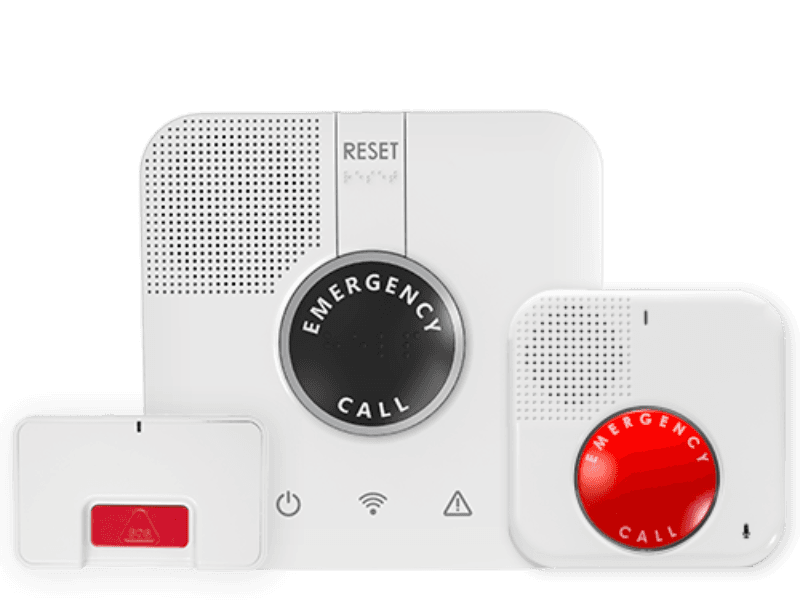
Every GetSafe package tier comes with a home base unit called the Control Panel. When you need help, you can activate the Control Panel by speaking to it or by pressing the emergency button in the middle. You can also call for help by pressing the wall button, speaking to the wall button, or yanking the pull-cord on the wall button.
“Medical alert systems are a great tool for getting help quickly,” says Shauna Buchmoyer, occupational therapist and certified fall prevention specialist at United Disabilities Services. “Oftentimes, people are able to push a button for immediate connection to someone who can help.”
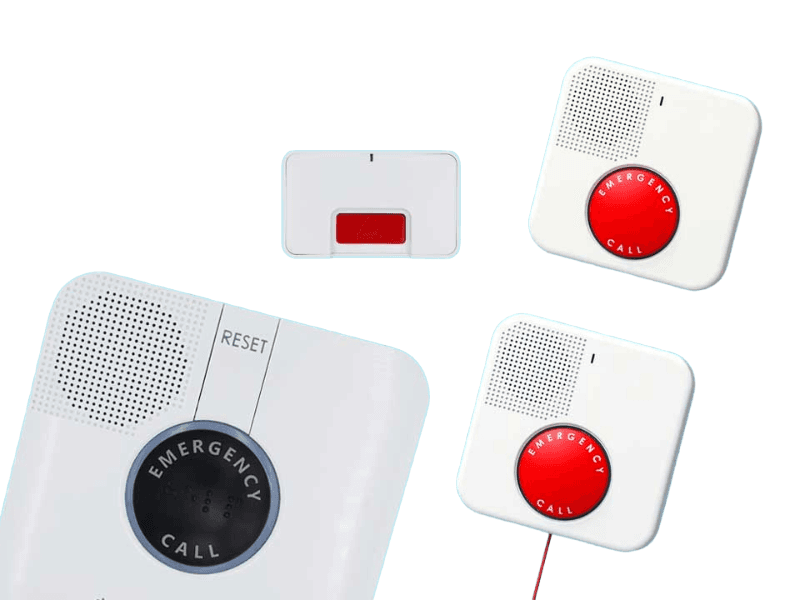
Buttons are the name of the game at GetSafe. The company offers two kinds of wall help buttons: pull-cord and smaller “standard” wireless wall buttons. All the help buttons you can add to your GetSafe system connect to the Control Panel—you just might need to pair them yourself.
GetSafe’s website proclaims, “all devices in the initial package will already be programmed for easy setup.” But this excludes any extras you order. For example, our testers ordered the optional fall detection necklace. That’s not a standard part of any GetSafe system, and thus didn’t arrive already paired. “Connecting the pendants was a bit more challenging and didn’t come preprogrammed,” said one tester.
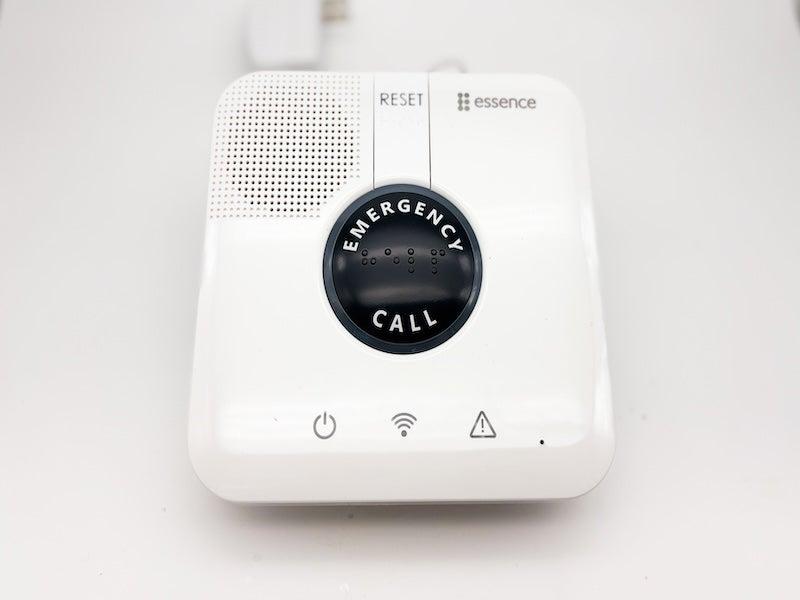
GetSafe’s enrollment tiers differ only in the amount of hardware included. The more you pay, the more help buttons you get as part of your plan. That said, you can pay to add more buttons to any plan tier.
Depending on the promotions GetSafe is running, you could buy its most affordable plan, the Starter, and pay to add an extra voice-activated wall button and one peel-and-stick wall button (which is not voice-activated and doesn’t have a pull-cord). You can basically build your own version of the GetSafe Standard plan for almost half the cost of the Standard Plan.
Before you try, though, note that it’s highly likely you’ll have to pair any bonus accessories to the Control Panel yourself. Our testers ranked GetSafe 1 out of 5 for setup on anything that didn’t arrive paired. So while you can certainly save money by piecing together your own GetSafe package, you might cause yourself a headache later on.
GetSafe also says in its Terms of Use that the company “reserves the right to limit the quantity of items purchased per person, per household or per order for any reason”—which may include letting you buy a certain quantity of help buttons.
GetSafe Standard: The brand's most popular package for a standard home
The GetSafe Standard promises to protect up to three bedrooms, compared to the Starter’s one bedroom. To do this, the Standard includes some extra hardware: a peel-and-stick wall button.
GetSafe Standard
- Friendly monitoring center
- Helpful indicator chart
- Responsive button
- Device type: At-home
- Fall detection: Yes
- Max. battery life: 32 hours
- GPS tracking: No
- Caregiver alerts: Yes
- Connection type: Landline or LTE (model dependent)
Pros
- Protects 2 to 3 rooms
- Includes standard wall button
- Clear audio
Cons
- Wearable costs extra
- Add-ons don’t arrive paired
- No testing mode
What’s different about GetSafe Standard Medical Alert
The GetSafe Standard comes with:
- The Control Panel
- Two voice-activated wall buttons
- One peel-and-stick wireless wall button
You should place peel-and-stick wall buttons where you can reach them after a fall, like along the floor trim or someplace you can reach from the bathtub. If you have stairs, place a wall button along the bottom of the staircase wall.
Depending on the promotions running at the time of purchase, it may save you money to add buttons to the GetSafe Starter base package instead of purchasing the GetSafe Standard package.
GetSafe Select: More coverage for multi-level spaces
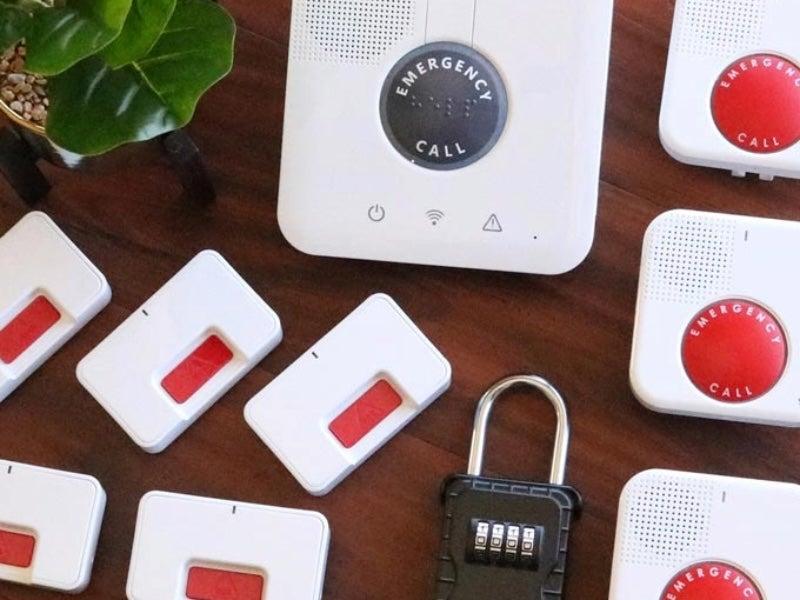
The GetSafe Select has the largest range of all GetSafe offerings, advertising that it can protect up to five rooms. To cover this range, the Select comes with a Control Panel and five buttons.
GetSafe Select
- Clear instructions for Control Panel
- Largest range in GetSafe family
- Friendly monitoring center
- Device type: At-home
- Fall detection: Yes
- Max. battery life: 32 hours
- GPS tracking: No
- Caregiver alerts: Yes
- Connection type: LTE
Pros
- Clear audio
- Simple to unbox
- Protects up to 5 rooms
Cons
- 61-second average response time
- No call cancellation
What’s different about GetSafe Select
GetSafe Select advertises that it can cover four to five rooms. The only major difference from the GetSafe Select is that it includes more help buttons than any other GetSafe package. The Select includes:
- The Control Panel
- Three voice-activated wall buttons
- Two peel-and-stick wireless wall buttons
How we tested GetSafe medical alert systems
Medical alert systems can be an important tool for staying safe and maintaining independence. If you’d like to learn more about how we test the devices, dive deeper into our medical alert system testing methodology.
We tested GetSafe by unboxing the system. Next, our testers pressed the help button to experience the emergency response times. Our testers reported that the GetSafe monitoring center operator they were connected to (they had the same operator for every test) was thorough and easier to hear. “They were really nice!” one tester said of the operator.
GetSafe’s first test call took 93 seconds to connect, lowering its average response time to 61 seconds. Traditionally, you want an MAS with a response time of less than 60 seconds. GetSafe makes up for this response time lag with its dependable follow-up policy.
GetSafe says on its site that if an operator can’t reach you, the monitoring center will send in emergency responders—and our testers found this to be true. When one tester unplugged the GetSafe system to cancel a test call instead of verbally canceling with the operator, firefighters promptly arrived.
“The response time was amazing!” said the tester, “The fire department showed up in five minutes. Even though it was an accident, it was great to see the device in action.”
How much do GetSafe plans cost?
GetSafe’s subscription tiers differ only in the amount of equipment provided, so the equipment fee is the bulk of the cost. GetSafe is transparent about its pricing and often runs sales.
Fall detection is a feature of wearable technology, to which GetSafe positions itself as an alternative. If you want fall detection in your GetSafe network, you'll need to pay an extra $25 to include a lanyard in your GetSafe system. After that initial fee, fall detection is $10 per month. You can add the lanyard to any GetSafe subscription tier. If you’re interested primarily in fall detection, you might want to check out our best medical alert systems with fall detection.
Comparing the cost of GetSafe plans
| Comparison Features | Starter |
Standard |
Select |
|---|---|---|---|
| Monthly Cost: | $30 |
$30 |
$30 |
| Equipment fee | $79 |
$193 |
$307 |
| Protection plan | $5/month |
$5/month |
$5/month |
| Fall detection | $10/month |
$10/month |
$10/month |
How to save money on GetSafe devices
The first way to save money on GetSafe devices is to build your own package using the Starter. Opting for annual billing doesn’t save you money, but GetSafe frequently runs promotions on its site that lower startup costs or waive shipping fees.
Medicare doesn’t cover medical alert systems in most cases. But some are considered qualified expenses under flexible spending accounts or health savings accounts.
GetSafe accessories and options
“Without having [the] ability to push a button for help, older adults could be on the ground waiting for help until a loved one or a friend comes to check on them,” says Buchmoyer. If an older adult doesn’t receive help within the hour they fall, this is what’s called a “long lie.” Some long lies can lead to complications like dehydration or muscle and tissue damage.3
The more places you have a help button you can reach, the less likely you’ll experience a long lie after a fall. You can customize your GetSafe system by adding as many buttons as it takes to make your home feel safe to walk around in.
Any of the button add-ons below interacts with the Control Panel, including the necklace. The lockbox, which can be hooked to your front door, allows emergency services to safely access your home. The GetSafe Monitoring Center will read your code to the emergency responders.
- Voice-activated wall button with pull cord: $79 each
- Wall button: $35
- Lockbox: $30
- Necklace: $25
The GetSafe user experience
GetSafe uses its own cellular network, and you don’t need a landline to get it up and running. Our testers reported that “it was super easy to understand the instructions” when assembling the GetSafe system.
GetSafe scored well in many categories, but setup and pairing were rocky. Our testers awarded GetSafe a 3 out of 5 for setup and a 1 out of 5 for pairing, because GetSafe does not pair the lanyard wearable for you.
GetSafe markets itself as the medical alert system you don’t need to wear, so the company focused on ensuring the wall buttons and Control Panel had a simple setup. The video on the GetSafe homepage prominently advertises “all devices in the initial package will already be programmed for easy setup.” The lanyard simply isn’t part of the “initial” package.
But even with GetSafe’s understandable focus on help buttons, it would’ve been nice if the instructions for pairing the lanyard (which costs an additional $25) were correct. Our testers report that the quick-start guide for setting up the Control Panel and the buttons was clear and helpful, but there is no such support for pairing the lanyard.
“The directions were wrong for pairing the device,” said one tester. “I think someone setting this up alone would get pretty darn frustrated.” After some trial and error, our testers eventually figured out that the lanyard has a pairing button—but the instructions didn’t assist them in that discovery. The instructions told them to press the on/off button.
GetSafe customer service and warranty
GetSafe’s Customer Care hours are Monday through Friday, 7 a.m.–3:30 p.m. PT. Its monitoring center is available 24/7. You can reach the Customer Care team at 888-799-6255.
For GetSafe, the warranty is the protection plan; the company even calls it a “warranty plan.” Your device does not come with a warranty. You can add the warranty plan for $5 per month, which covers up to one free base console replacement annually, and 50% off accessory replacements.
Beyond the 30-day risk-free trial period, there isn’t really a refund or return window. The only way you get a refund is by returning GetSafe products in unused condition, or by reaching out right after your credit card is charged.
Are GetSafe devices right for you?
The GetSafe medical alert system is best for people who don’t like (or who can’t remember to put on) wearables. GetSafe could also be a good fit for people who spend most of their time at home. Home size affects your GetSafe budget: covering more rooms increases costs.
If you’re considering a GetSafe medical alert system, ask yourself:
- Do I spend more time indoors or outdoors?
- How many rooms do I need/want a help button in?
- Do I want a wearable?
- Do I want GPS-powered protection when I leave the house?
If the answer to the last question is “yes,” you may want to take a look at our Best Medical Alert Watches instead.
Frequently asked questions
Is GetSafe medical alert legit?
Yes, GetSafe medical alert is legitimate. It’s a branch of the Bay Alarm medical alert company.
Does GetSafe offer fall detection?
Yes, GetSafe offers fall detection on its lanyard. Fall detection is often for wearables, and GetSafe markets itself as wearable-free. But you can add a lanyard to your GetSafe package for $25, and add fall detection for $10 per month.
Does Getsafe medical alerts have an app?
There is no app for the GetSafe medical alert system.
Does Medicare cover GetSafe medical alert systems?
Usually, no. But some Medicare Advantage plans might cover a medical alert system.
Questions? Email us at reviewsteam@ncoa.org.