
Need a Ride to Vote on Election Day? Find Help Getting There With Lyft
6 min read


Related Topics
Early voting for the 2026 election is already underway, and older adults deserve the opportunity to make their voices heard at the polls. But getting there can be a challenge when affordable, reliable transportation isn't available. That's why NCOA has partnered with Lyft to help reduce transportation barriers and make it easier for older adults to exercise their right to vote.
Through Lyft's Voting Access Program, older adults can get up to $50 in ride credits per person. You can claim your Lyft ride credits to help cover transportation between now and on Election Day, November 3. Ride credits are available while funding lasts, so don’t wait to make your plan to vote!
Using the NCOA-Lyft voting access ride codes
| What is the ride code I’ll use in my Lyft app? | Use code NCOAELECTION26 |
| How do I get started? | Visit Lyft's ride code link to get started or schedule a ride: https://www.lyft.com/i/NCOAELECTION26 |
| How much is the ride code worth? | The code provides up to $50 in Lyft ride credits per person to help cover rides to and from the polls. |
| How long is the ride code valid? | The NCOA-Lyft ride code is valid through Tuesday, November 3, 2026 (Election Day), at 11:59 p.m. Ride credits are available while funding lasts and are limited to 500 riders. |
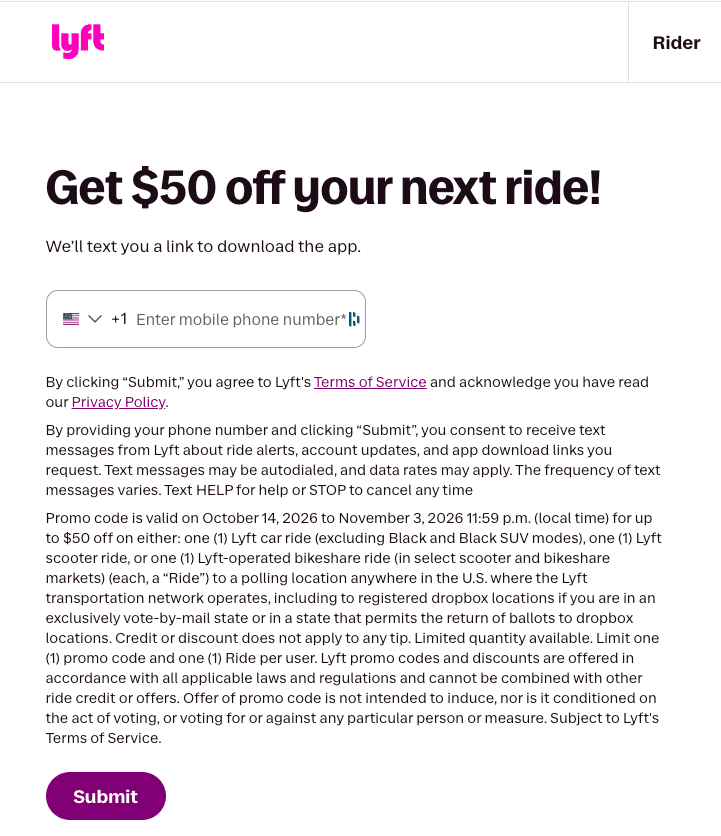
How to create a Lyft account to use the NCOA Voting Access ride codes
Creating a Lyft account:
- If an older adult doesn’t have a Lyft account, the first step is to download the Lyft app onto their phone from the App Store or Google Play Store.
- Tap ‘Get Started’ on the main screen and follow the prompts to create an account.
- After entering their cell phone number, they’ll receive a verification code through an SMS text message.
- They will enter this verification code to log into their new account on the Lyft app.
- They will need to enter their name, email address, payment information, and take a photo so the driver knows who they’re picking up.
- Once they’ve completed these steps, they’re ready to request a ride.
If you’re having trouble creating an account, visit Lyft’s Help Center.
How to apply the Lyft voting access ride code:
- Open the Lyft app.
- Tap the ‘Menu’ icon in the upper left-hand corner.
- Tap ‘Rewards’.
- Enter the promo code: NCOAELECTION26
Important note: Do not add the voting access ride promo code until immediately before you order a ride in the app.
Once you’re done applying the code, here’s how to request a ride:
- Tap ‘Search Destination’ and enter the drop-off location (location of polling station).
- Select the preferred ride type.
- Tap ‘Select Lyft’.
- Confirm or change the pickup location before tapping Confirm and Request.
- Once you've enabled GPS locating in the phone settings, the Lyft app will automatically set the current address as the pickup location.
If you’re having trouble requesting a ride, Lyft offers more guidance in its Help Center.
How Lyft prioritizes safety for older adults
Lyft is dedicated to helping create a comfortable shared space. Before riding with Lyft, riders must agree that they’re symptom-free and will follow CDC guidance related to COVID-19.
Quick tips for older adult riders
Request from a safe place
An indoor location, for example, reduces time spent waiting on the street. Choose a pickup spot where drivers can easily pull over. (This means no bus stops or other no-stopping zones.) Take enough time to make sure you’re getting into the right car.
Match the ride
Always check that the arriving car matches the license plate, make, and model displayed in the Lyft app. Also, take a look at the driver’s photo and name.
Share your trip info
Share your location and route with family or loved ones so they can follow along in real-time.
Keep your contact information private
The rider’s address or contact info won’t be shown in their driver’s ride history.
FAQ for caregivers and aging services professionals helping older adults
Can I use the promo code for any ride an older adult may need?
No. The NCOA-Lyft ride code is intended to offer access to free or discounted rides to and from an individual’s polling station. They can't and shouldn't be used for other purposes. This ride code can't be used toward tips for drivers.
What if an older adult I care for doesn't have a smartphone? Can I or someone else call a ride for them?
Yes. Lyft’s feature, Rides for Others, allows you to order a trip for another person. As you enter the location details, click on the “Me” picture on the top to change the person you are calling the ride for. Once you pay, you will get a notification when a driver picks up the designated rider, and you'll be able to follow their trip progress.
Please note: The ride recipient must have their own Lyft account and will see the ride details in their Lyft app.
How do I pay for the Lyft ride?
When the ride is over, Lyft will ask you to rate the driver and confirm payment by selecting the promo code. You can then add a tip and tap Submit. You will receive a receipt with all payment info.
What if the promo code doesn't work?
- It’s expired. This voting access promo code was valid through Tuesday, November 3, 2026 (Election Day), at 11:59 p.m.
- It’s no longer available. A limited number of ride credits were available through NCOA on a first-come, first-served basis. Credits were available while funding lasted.
- It's in a different currency. Promos for ride credit can only be used if the promo currency matches the currency where a ride is taken.
- It's a business ride. Ride credits won't apply by default to Business Profile rides. On the rate and pay screen, you can manually apply a specific promo code by tapping on your payment method (just above where it says either Business or Personal). From there, tap on Change Applied Promos to enter the promo code you want to use.
- You’ve already used up all your credit. If you’ve already used all credit on previous rides, you’ll be able to see that in your Ride History.
- The ride you’re taking costs more than the ride credit. If your ride costs more than your promo balance, another form of payment will be charged for the remaining amount.
Make a Plan to Get to the Polls
Your vote matters, and transportation shouldn’t stand in the way. Use the NCOA-Lyft ride code NCOAELECTION26 to access up to $50 in ride credits to help you get to the polls. Credits are available while funding lasts and expire on Election Day, Tuesday, November 3, 2026, at 11:59 p.m.