
GoodTrust Reviews
GoodTrust was our pick for Best All-in-One estate planning service. In this GoodTrust review, we explain its features, pricing, and whether it’s the right online will maker for your needs.

- Our testers loved how straightforward it was to use GoodTrust.
- GoodTrust costs $149. All estate planning services are included in that cost.
- Estate planning through GoodTrust is interactive and modern, with elements like social media memorialization and password storage other estate planners don’t offer.
- GoodTrust can help you build a simple will in less than six minutes. But it might be missing some specifics your attorney needs before approval.
NCOA connects older adults and their families with trusted tools and resources that support health, independence, and peace of mind. When it comes to estate planning, that means carefully vetting the services we recommend to help you feel confident about making important legal decisions online.
We spent more than 200 hours researching and evaluating online estate planning platforms before making our recommendations. We:
- Consulted with estate planning attorneys, financial advisors, and care providers
- Created accounts and completed real estate planning documents using each platform’s tools
- Evaluated ease of use, document accuracy, customization options, and security protocols
- Reviewed thousands of verified customer ratings to understand satisfaction, support, and usability trends
Our testing is ongoing. And we continue to monitor new features, updated policies, and platform improvements so our recommendations remain current and relevant. Read more about our estate planning testing methodology.
Estate planning may sound complicated and intimidating, but it doesn’t have to be. These days, dozens of online will makers can help you start your will, no matter your income or assets. When we surveyed American adults about why they’ve delayed estate planning, 18% of respondents said “I don’t have enough assets.”1 But estate planning isn’t only for the wealthy. If you own a car or a condo, or don’t own property but have a savings account, you have enough assets to merit making a will.
Online estate planning software doesn’t eliminate the need for a lawyer. But it cuts down on the time and money you need to spend on one. Of our respondents who have used online estate planning, 58% said they didn’t feel they needed help from an attorney to fill out their forms.1
Without an online will maker, you’d likely be paying an attorney for the time it takes to put together your documents. Depending on your attorney’s rate, the cost could reach a few thousand dollars. Our respondents were right on the money: 7% put off estate planning for fear it would cost too much.1 A service like GoodTrust can help you gather and complete your estate documents for one low price. Then, all you have to do is get a lawyer and a notary to go over the documents and sign off. This may help you save time and lower attorney fees.
This GoodTrust review breaks down the ins and outs of the online will-making software. We look at what it does, how much it costs, and what your GoodTrust estate planning storage options are. Plus, we’ll compare GoodTrust to other online U.S. estate planning software.
GoodTrust
- Make a will, trust, and directives for health care, finances, final wishes and pets for one price
- Estate plan for more than one person at no extra cost
- Digital Vault included
Why we like GoodTrust
GoodTrust was awarded Best All In One in our roundup of best online will makers because you can handle multiple estate planning documents through GoodTrust’s estate planning software. Beyond wills, you can use GoodTrust to make trusts, health care directives, and pet directives.
Our testers also liked GoodTrust because documents created using the platform are good in all 50 states. That’s not something every online will maker can claim. For example, Nolo Quicken WillMaker isn’t valid in Louisiana due to the state's estate planning laws.
There’s no extra cost to make more than one will on GoodTrust, so you can estate plan for the entire family. If you pay extra ($39 at the time we were testing), you can make updates to your documents for up to a year. Not every online will maker retains your documents after your will is complete. GoodTrust’s Digital Vault lets you hold onto your files.
GoodTrust has been in business for about 10 years, which is a shorter time than other online will makers like LegalZoom and RocketLawyer. But unlike RocketLawyer, which has no satisfaction guarantee, GoodTrust offers you a full refund within 14 days. Almost 8% of our survey respondents who have a will or trust built their estate plan through GoodTrust.1

58% of our respondents didn’t feel they needed help from a lawyer to fill out their online estate planning documents.1
GoodTrust pros and cons
Pros
- All-in-one package for a single fee
- Unlimited revisions
- Pet directives
- Can make documents for multiple family members
Cons
- Testers felt the questionnaire was too vague about some points
- Attorney access costs extra
- No free document shipping—a printer is needed
How to choose the best online will maker for you
Our survey respondents who made a will online were able to complete the process themselves with minimal issues. “It was simple and much cheaper than getting a lawyer,” one respondent said. “It was a great experience,” said another. Someone else called online will makers “self-explanatory and easy to navigate.”1
Choosing the best online will maker for you involves considering the assets you have and what you want to do with them. If what you have to leave your loved ones is fairly simple, you don’t need an online will maker that charges extra for attorney access. If you won’t need to update your will any time soon, you don’t need an online estate planning software that lets you update your documents (usually for a fee). Nor do you need to pay for an online will maker with storage.
Some online estate planning software has limitations and can’t generate a will valid in every state. Before selecting an online will maker, ensure your state of residence is one of the covered states.
Compare GoodTrust vs. competitors
| Comparison Features | |||||
|---|---|---|---|---|---|
| Cost for attorney access | Yes |
Yes |
Yes |
Yes |
Yes |
| Wills for multiple family members | Yes |
Yes |
Yes |
N/A |
Yes |
| Satisfaction guarantee | Yes |
No |
Yes |
No |
Yes |
| Secure digital storage | Yes |
Yes |
Yes |
Yes |
Yes |
| Free unlimited update period | No |
No |
No |
Yes |
No |
| Available in all 50 states (+DC) | Yes |
No |
No |
Yes |
Yes |


GoodTrust estate planning services
According to the video on its homepage, GoodTrust is "on a mission to democratize estate planning and bring it to everybody, regardless of age, wealth, or family situation.” The company offers an all-in-one package for creating multiple wills, trusts, and directives.
There are no individual document-specific GoodTrust packages like there are for other online will makers. You pay the $149 fee to make a will or a trust, and you get all the documents that come with it. The only differences in the two packages is the estate plan itself: Are you making a will that is subject to probate, or a trust that is not?
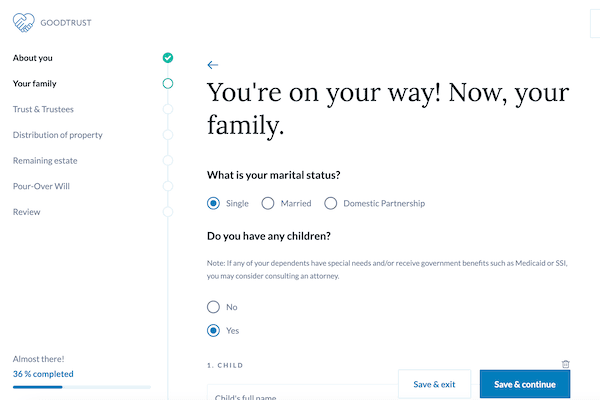
After the first year of GoodTrust membership, you’ll be charged $39 a year if you want to continue making updates to your estate planning documents. Many online will makers don’t offer an option to edit your documents in the future, regardless of the fee. This was one reason GoodTrust stood out to our testers.
Like other online estate planning software, you can store files in GoodTrust once you pay for a membership. But GoodTrust takes storage one step further—its Digital Vault holds more than your estate planning paperwork. It can also hold passwords for things like your phone, your router, and any other device someone might need access to when you die. Anyone with access to your GoodTrust account will retain access to the device passwords you store there.
GoodTrust, as the name implies, also offers trusts (a more complicated document for those with more assets). But the list doesn’t end there. With a GoodTrust online estate planning account, you have access to:
- Revocable living trust
- Last will and testament
- Financial durable power of attorney
- Advanced health care directive (ACHD)
- Funeral directive
- Pet directive
- Digital Vault
GoodTrust’s last will and testament services
“Without a will, you have no say in what happens after your death,” said Patrick Hicks of Legal Karma, an estate planning software company. “Every state has default laws that apply if someone dies without a will. These laws may not provide the outcome you would want.”
For example, if you planned to leave a house or some money to someone after your death but didn’t specify that in your will, your intended beneficiary may never receive the money. If you had money set aside for your own funeral expenses but didn’t leave that money to anyone in your will, those who survive you in death might need to pay out of pocket for your final wishes. “In some cases the outcomes can be very detrimental,” said Hicks.
Because GoodTrust has such a robust list of estate planning offerings, knowing which ones are right for you can further smooth out the process. Both wills and trusts are legal documents directing the state what to do with your assets when you die. Wills are often subject to probate court, meaning any assets you left your family might not get to them for another six months or so, minimum. Probate can complicate funeral expenses.
One way to avoid complications in probate court is to establish a trust. Trusts have their own federal tax IDs and are managed by a trustee you (the grantor) appoint. By placing your home and any property into a trust, the trustee assures your wishes are carried out after your death. A revocable trust (the kind you can edit easily while still alive) is enough for most people. But if you have considerable or complicated assets, you might want to look into an irrevocable trust. GoodTrust offers only revocable trusts through their online estate planning services.
7.6% of our respondents used GoodTrust to make their estate planning documents.1
How GoodTrust works
Our testers found GoodTrust had a low barrier to entry, calling it “intuitive and easy to sign up.” GoodTrust allows you to begin creating a will after verifying your email address.
GoodTrust’s homepage says it takes about 20 minutes to complete an online will. Our testers confirmed the process was indeed that swift. One tester finished GoodTrust’s estate planning flow in six minutes. But “swift” doesn’t mean “sloppy.” Of our survey respondents who used GoodTrust to build their wills online, 58% felt very confident the final document reflected their wishes, and 42% felt somewhat confident.1
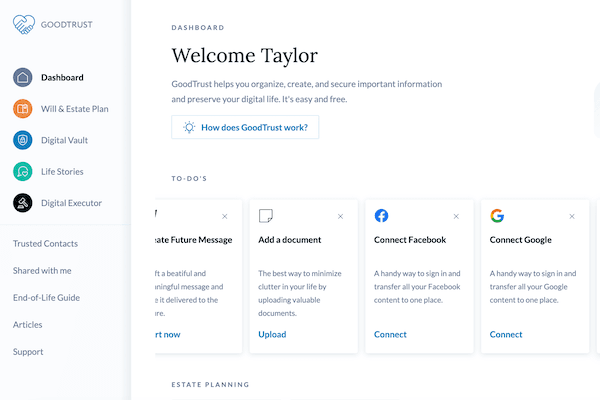
Unlike other online estate planning software that guides you through a form to fill out, our testers report GoodTrust breaks your will into sections with different forms and checklists. “I like this type of interface in a lot of ways because you can fill it out in little bite-size sections,” one tester said. But this multi-form approach may lead to missing information. Our testers weren’t ever prompted to upload documents needed to complete a will. You can upload your documents to the Digital Vault at any time, but our testers would have loved to see some prompting, or straightforward commands, like “upload your car title.”
When you’re done, all you need to do is print your will and get it signed by two witnesses who are not named in the will (This may vary by state). Then, you upload a scan of the printed will into your GoodTrust Digital Vault. We still recommend paying an attorney to go over the final document, just to make sure it's in compliance with your state of residence. You can often get your will notarized the same day an attorney approves it. Many law offices have a notary on-site.
If you like something more interactive this site is great, but if you want something more 'start-and-finish-in-one-sitting, without clicking around,' this maybe won't be for you.”
— One of our testers on GoodTrust vs. other estate planning software
What you need to create an estate plan through GoodTrust
Our testers said GoodTrust is vastly more interactive than other online will makers, and you can choose the order in which you fill out the forms and checklists. One of our testers completed their will on GoodTrust in six minutes because they weren’t prompted to upload forms to the Digital Vault, so they didn’t upload any documents. To complete the process, you will need to upload the proper documentation before consulting with an attorney.
If you do plan to upload forms to GoodTrust’s Digital Vault, make sure you have:
- Car titles and house deeds
- Lender information, if you are still paying on a house or car
- Full names and contact information for all people you plan to name in your will
- Primary bank account information (checking and savings)
- Retirement and other investment account information
- Life insurance policy numbers
- Full name(s) and contact information of the executor(s) of your estate
- Social media passwords
- Other digital account logins and passwords.
GoodTrust has an entire section dedicated to how your social media accounts are memorialized or managed after your death. There is a spot in your Digital Vault for your passwords, so your beneficiaries can easily close down your accounts and pay off any remaining bills.
GoodTrust costs
At $149 for the whole package, GoodTrust costs are fairly average across the online will maker industry. There is a reason GoodTrust earned “best all-in-one” in our roundup of best online will makers—you can complete many common estate planning tasks through GoodTrust.
There are no itemized prices on GoodTrust. No matter what service you choose, using GoodTrust costs $149. For this price, you can create a will or you can complete all your estate planning documents. If you need or want to retain access to the GoodTrust Digital Vault, it’s $39 each year.
Can you update your GoodTrust will?
You need to update your estate planning documents with every birth, death, marriage, divorce, or move for yourself or any beneficiaries. Not having the right address for a beneficiary might complicate them getting their inheritance from you. If you experienced any change in assets (Did you move? Sell a car? Buy a car?), an updated list of your assets needs to be in your estate plan.
Our testers found updating a will on GoodTrust to be straightforward. As long as you pay a $39 annual fee, you retain access to your Digital Vault. You can sign into your existing will or trust, update your beneficiaries or assets, and reissue the will. You can then get the new will signed, notarized, and reuploaded to GoodTrust.
GoodTrust customer service
GoodTrust customer service is available seven days a week. There’s a live chat on the GoodTrust homepage, and a help center full of articles. GoodTrust’s Trustpilot page is studded with stories of GoodTrust going above and beyond, including a post about how GoodTrust co-founder Robyn Sechler once reached out personally.
GoodTrust customer reviews
The Better Business Bureau (BBB) graded GoodTrust an A+, but GoodTrust is not accredited with BBB. Customer reviews do not affect BBB ratings and grades. Instead, the grades are based on company responsiveness, transparency, and customer complaints.
Trustpilot ranked GoodTrust 4 out of 5 stars, based on 53 reviews. The majority of GoodTrust’s reviews (62%) are positive. Reviews are polarized, with both highly positive and highly negative feedback. Negative 1-star reviews make up 19% of GoodTrust’s Trustpilot page.
“I've been putting off estate planning for years. It's not one of those things you want to think about (aka death) and what happens when you're gone. GoodTrust gave me the easy button and allowed me to put my estate in order. I absolutely love the Digital Vault also so my kids have one place to go to for all of my usernames and passwords.”
—JULIE E., VERIFIED CUSTOMER REVIEW (TRUSTPILOT.COM)
“I had an issue with my subscription activation. Robyn Sechler took the time out and reached out to me personally and the issue was resolved. In today’s world of bots this personal attention is uncommon and greatly appreciated.”
—JOE C., VERIFIED CUSTOMER REVIEW (TRUSTPILOT.COM)
“I have a problem with my will. I have paid for the whole package and have not got a email call or chat for over 30 hours!”
—SHAWN, VERIFIED CUSTOMER REVIEW (TRUSTPILOT.COM)
Frequently asked questions
Is GoodTrust better than Trust & Will for will making?
GoodTrust and Trust & Will are fairly evenly matched. Both allow estate planning for multiple family members, both have a satisfaction guarantee, and both offer digital storage. But GoodTrust is available in all 50 states. Trust & Will is not available for trusts in Louisiana.
What does GoodTrust cost?
GoodTrust costs $149. For this price, you get more estate planning options and storage included than many other online will makers offer. Plus, you can edit your will for up to a year after you create it for no additional fee.
Do you need to get GoodTrust online wills certified by a lawyer?
Yes. Depending on your state, your will is likely not legal until a lawyer reviews it and a notary signs it. What online will makers do is speed up the will creation process. This helps you bypass extra hours with a lawyer. After completing your documents, follow your state's witness and notarization requirements before execution.
Does GoodTrust have an app?
No. While some online estate planning software companies have apps, GoodTrust isn’t among them.
Questions? Email us at reviewsteam@ncoa.org.