
The 4 Best Apps for Sleep Tracking in 2026
Sleep tracking apps can monitor sleep stages, snoring, and nighttime wakeups. We tested popular apps to find the best options.

- Sleep Cycle is our Best Sleep Tracking App Overall because it doesn’t require a wearable, and the free version impressed our testers.
- The sleep tracking subscriptions on this list cost $3–$20 per month, but some apps offer free sleep tracking. Paid plans may provide more detailed data and additional features.
- Android and iOS each have specific sleep tracking apps. Many other sleep trackers are available for both.
- Pairing a sleep tracking app with a compatible wearable can add data such as heart rate and nighttime movement. The best sleep tracking apps can also use your cellphone’s microphone to record snoring and provide sleep insights.
- Our testing found that Garmin Connect offered the most free features, but it requires a Garmin-brand wearable. All of the other sleep tracker apps we tested worked without a wearable but had paywalls blocking some features like smart alarms and snore scores.
NCOA supports everyone’s right to age well. So we take the time to research, test, and recommend products that can help you live a healthier life. We’ve spent hours researching and testing sleep tracking apps to give you the most accurate product reviews. To find the best sleep tracking apps, we:
- Consulted with sleep specialists like doctors, occupational therapists, and physical therapists for guidance on choosing the best sleep tracking app
- Mystery-shopped brands and products
- Surveyed older adults on their sleep quality and sleep habits
- Interviewed experts on the importance of good sleep for older adults
- Worked with older adult testers to evaluate sleep tracking apps and get their opinion
- Read hundreds of verified customer reviews
We’re constantly testing new sleep tracking apps and sleep products to give you the most accurate and up-to-date recommendations. Read more about our sleep accessories review methodology.
Better sleep can improve health outcomes. Better sleep habits and the right mattress can help you get it. But how can you tell if these changes are working? Sleep tracking apps can’t diagnose sleep conditions. But they can give you data about the amount and type of sleep you’re getting. We tested some popular options to compare their features, costs, and ease of use. Here are our picks for the best apps for sleep tracking.
Sleep Cycle
Good accuracy without the need for a wearable
Garmin Connect
Free and easy to use but requires a Garmin watch or band
Pillow: Sleep Tracker
Built for Apple users
Best sleep tracking apps in 2026
- Sleep Cycle: Best Sleep Tracking App Overall
- Garmin Connect: Best Sleep Tracking App for Fitness
- Pillow: Sleep Tracker: Best Sleep Tracking App for iOS
- Sleep as Android: Best Sleep Tracking App for Android
The best sleep tracking apps in 2026 compared
| Comparison Features | ||||
|---|---|---|---|---|
| Score (out of 10) | 9.9 |
9.8 |
7.8 |
8.1 |
| Best for | Overall |
Fitness |
iOS |
Android |
| Platforms available | App Store, Google Play |
App Store, Google Play |
App Store |
Google Play |
| Additional features offered | Breathing exercises, snore tracking, trend data |
Sleep coaching, smart alarm, snore tracking |
Sleep stages, historical trends, smart alarm, snore tracking, sleep coaching |
Historical trends, smart alarm, sleep coaching, ad removal |
| Wearable required? | No |
Yes |
No |
No |
How we tested the best sleep tracking apps
We looked for the following features when choosing the best sleep tracking apps:
Sleep Cycle: Best Sleep Tracking App Overall
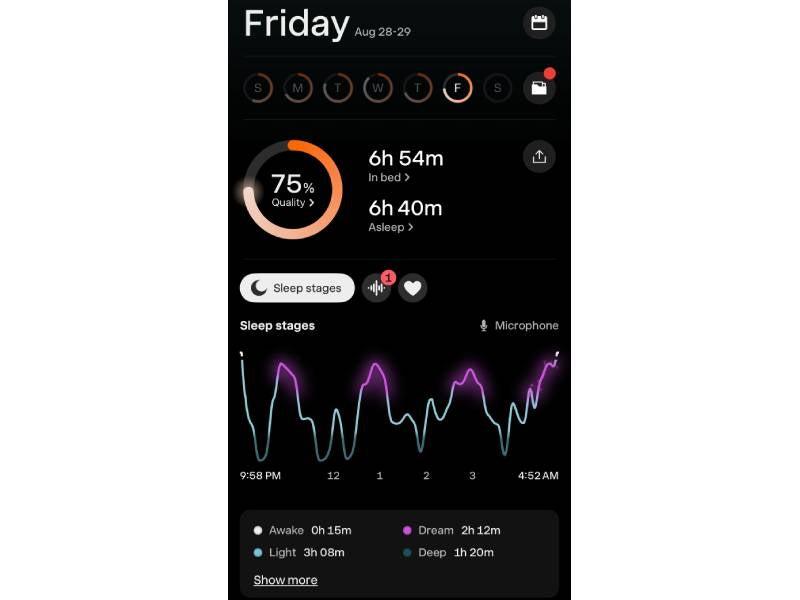
Sleep Cycle earned the top spot as our Best Sleep Tracking App Overall. Our testers had a positive experience with its smart alarm and sleep-tracking features. The app earned high marks for its user experience and clear display, and you don’t need a wearable to use it.
- Earned the highest accuracy score of all the trackers we tested
- Doesn’t require a wearable
- Smart alarm impressed testers
- Platforms available: iOS, Android
- Free account: Yes
- Setup score: 5/5
- Display score: 5/5
Pros
- No wearable needed
- Offers a 7-day trial and frequent longer promotional trials
- Quick setup
- Clear display and simple navigation
Cons
- Past sleep scores are harder to find
- Best audio recording experience requires paid subscription
Garmin Connect: Best Sleep Tracking App for Fitness
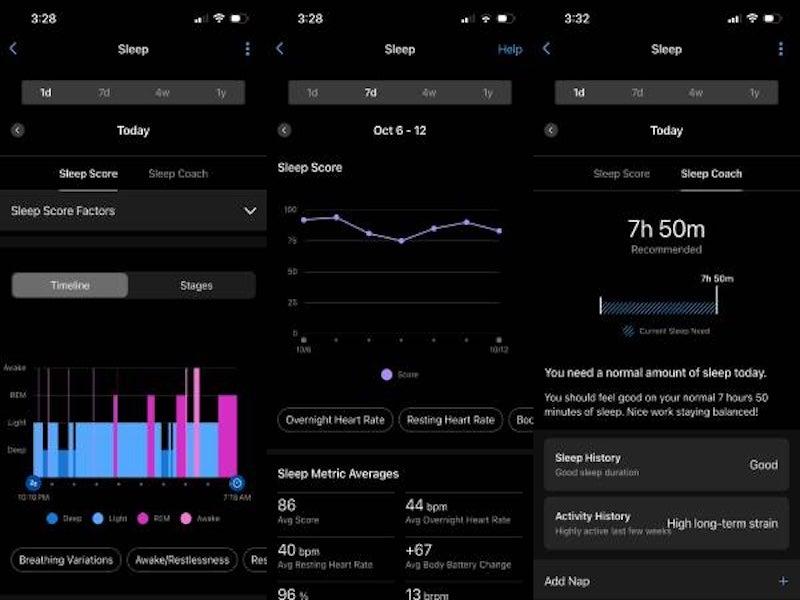
Garmin Connect earned top marks from our testers for its detailed and extensive sleep data. Our testers appreciated that the app provides this data without a paid subscription. If you want to track your fitness, Garmin Connect also compiles data on your recent workouts, estimated fitness age, and more. The only catch is that you need a Garmin device to use it.
- Offers a wide array of data
- Visuals are clear and understandable
- Provides fitness metrics as well as sleep data
- Platforms available: iOS, Android
- Free account: Yes
- Setup score: 5/5
- Display score: 5/5
Pros
- Nearly all app features are free
- Compatible with both Apple and Android
- Detects naps
- Free sleep coaching
Cons
- Requires a Garmin wearable
- May not be as accurate for sleepers who move more in their sleep
- Smart alarm is a paid feature
Pillow: Best Sleep Tracking App for iOS
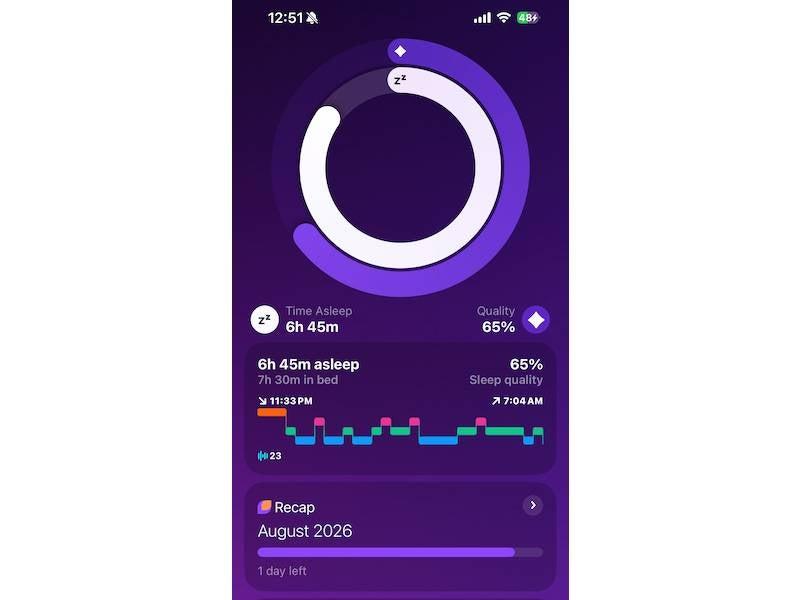
If you already have an Apple Watch or want to track sleep on your iPhone, Pillow: Sleep Tracker may be a good option. Most of its features are behind a paywall. But our testers felt the free version’s sleep scores reflected their experiences and provided helpful starting information.
- Free for iOS users
- Provides understandable metrics
- Can be used without creating a user profile
- Color-coded data display
- Platforms available: iOS
- Free account: Yes
- Setup score: 3.5/5
- Display score: 2.5/5
Pros
- Testers felt the metrics were accurate
- Smart alarm feature earned top marks
- Families can share a subscription
- Free version displays the previous night’s sleep score
Cons
- Free version only includes one night of sleep history
- Slowest setup of all the apps we tested
- Limited data insights
- Available on Apple products only
Sleep as Android: Best Sleep Tracking App for Android
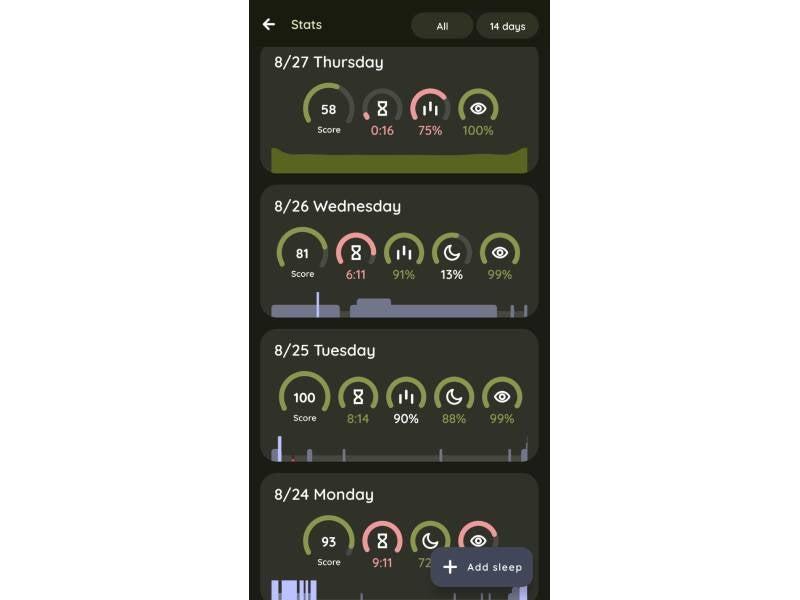
Sleep as Android offers a paid subscription starting at about $3 per month, making it one of the least expensive paid options we tested. With a basic, understandable data display and the option to manually input sleep, this Android app is great for sleep tracking beginners.
- Offers a lifetime plan tier
- Testers found it great for snore tracking
- Works with or without a compatible wearable
- Platforms available: Android
- Free account: Yes
- Setup score: 2/5
- Display score: 4/5
Pros
- Testers said it picks up sound well
- Intuitive scoring for sleep
- Testers liked the tracking accuracy
- Basic data display may work well for beginners
Cons
- Available only for Android
- No historical data trends in free version
- Pairing a wearable can be difficult
- Ads in free version can be distracting
Why should I consider a sleep tracking app?
Insomnia is more common among older adults and women.1 “But do not assume that poor sleep is simply part of aging,” said Danielle Wall, MD, a Burlington, Vermont-based board-certified physician and adviser for Sit ’n Sleep. “Persistent stiffness, discomfort, frequent waking, or feeling unrefreshed may indicate that your sleep environment is no longer supporting your body properly.”
A supportive mattress is important to achieve healthy sleep, but it’s not the only factor. A sleep tracking app may help you identify sleep patterns that contribute to waking up less refreshed. A qualified healthcare professional can evaluate your symptoms and diagnose a sleep disorder. Sleep trackers don’t track brain activity the way a sleep study can. Instead, sleep tracking apps can help you gather a baseline of your sleep behaviors. If you suspect you have an underlying condition like sleep apnea, talk to your doctor.
How do sleep tracking apps work?
Sleep tracking apps use sensors on your smartphone—most often the microphone—and sensors in your fitness wearable. These sensors gather data on changes in your breathing, snore patterns, and sleep interruptions. Movement sensors, called accelerometers, in wrist-worn devices can also detect movement while you sleep.² Other sensors focus on:
- Movement tracking
- Heart rate monitoring
- Sound detection
- Body temperature
- Blood oxygen levels
- Ambient room temperature
How do subscriptions for sleep tracking apps work?
Sleep tracking app subscriptions unlock bonus features or extra data. Garmin Connect provides many sleep tracking features without a subscription. But you still need a compatible Garmin wearable to access the app’s sleep data. Sleep as Android and Sleep Cycle offer trial access to additional features. After the trial, some features may require a paid subscription.
Our testers’ favorite features were behind the paywall for most apps we tried. Each app offers some sleep information without a paid subscription or during a trial. But the features and access periods vary. Historical data, like a weekly recap of sleep scores, is often available only with a subscription.
Garmin Connect is the exception—you can see and do a great deal with this app for free. But you need a Garmin-brand smartwatch or band to use it (The same is true for Garmin Connect+, the paid subscription tier).
Depending on the app, a paid subscription may unlock these features:
- Sleep score
- Sleep duration
- Time to fall asleep
- Time awake and wakeups
- Sleep stages (light, deep, REM)
- Heart rate
- Snoring
- Breathing
- Sleep consistency
- Sleep coaching
- Sleep debt
- Energy/readiness score
- Smart alarm
- Meditation sounds
Who should consider a sleep tracking app?
Sleep tracking apps cannot diagnose sleep disorders. If you’re concerned about your sleep, talk with your healthcare provider. But if your goal is improving your sleep hygiene (your bedtime routine), a sleep tracker may be right for you. A sleep tracking app might also be the answer if you’re sure your mattress (or your partner) isn’t the culprit behind a less-than-restorative night’s sleep.
Because sleep tracking apps detect changes in breathing, snoring, and nighttime movement, they can also help you monitor sleep disturbances.
What to look for when choosing a sleep tracking app
Sleep is one of the most widely tracked activities.3 That means there are many products and features to meet the demand for more information about our sleep. But what should you focus on when looking for a new sleep tracking app? Here’s what we considered when researching and testing the best ways to track sleep.
Budget
Most sleep tracking apps offer a free version with basic features and a paid subscription with much more data. If you’re not sure whether the paid subscription is worth it, a free trial can help you decide. Many apps offer free trials for seven nights or more. The Garmin Connect app is almost entirely free, except for a few paid features, but it also requires a Garmin wearable. Sleep as Android starts at about $3 per month after the trial ends. Sleep Cycle, our top pick, costs $10 per month for a paid subscription. But our testers report that “the free version covers basically everything important.”
Data representation
More sleep data isn’t always more useful. Some apps show so much information that it’s hard to tell what matters. Our testers found that some apps present sleep data more clearly than others. For example, they reported that Pillow’s graphs are difficult to interpret. One tester also needed more time to understand Sleep as Android’s sound recordings.
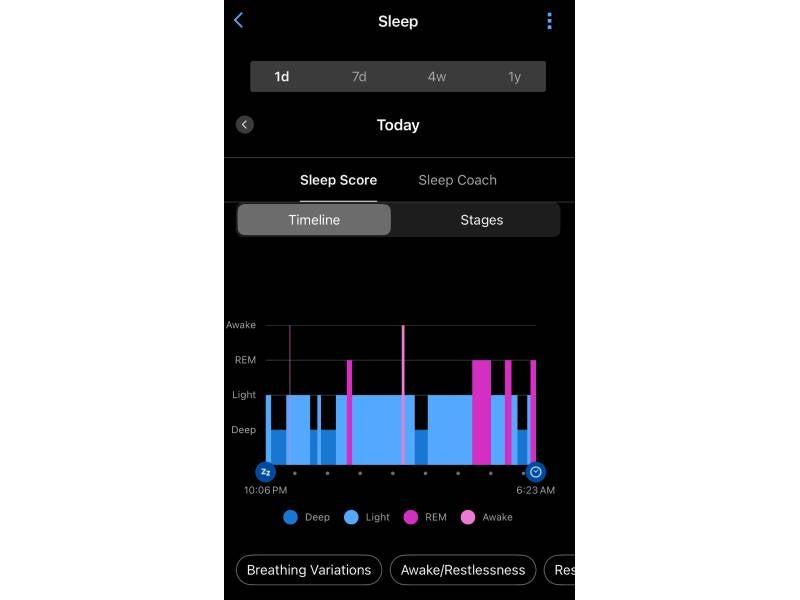
Garmin Connect breaks your sleep down into color-coded segments based on the kind of sleep you get and how long you spent in that sleep stage. That’s why it earned a 5/5 for data display.
Additional features
Our testers found that many of the best sleep tracking apps share a similar set of features: sleep coaching, smart alarms, snore tracking, heart rate and sleep-stage tracking, and sleep scores. Other features you might want depend on whether you’re also using your sleep tracking app as a fitness app or alarm clock.
Pillow includes meditations and bedtime stories, plus white noise machine features. Sleep as Android offers nature sounds. Sleep Cycle has a chatbot so you can ask questions to help better understand your sleep data. Garmin Connect’s Body Battery score estimates your current energy level using sleep and activity data.
Smart alarm
Multiple testers praised the smart alarm feature, which is designed to wake you during a lighter period of sleep within a time window you choose. “Getting up in the morning has been tough in the past, but the alarm timing has been accurate,” one tester said. “It was nice to not feel grumpy or startled by a loud noise first thing in the morning.” Smart alarms often require a subscription. All of the best sleep tracking apps we tested have a smart alarm.
Device compatibility
Sleep Cycle is available for iOS and Android. Check whether your specific wearable is compatible before using it for additional sleep metrics. You’ll need to pair the app with a compatible wearable if you want heart rate data. Pillow is available for Apple devices, while Sleep as Android is available on Android smartphones and supports certain compatible wearables.
You can install the Garmin Connect app on Apple and Android phones. But you still need a Garmin-branded wearable to use it. Apple Watches and Google wristbands are not compatible and you can’t connect these to your Garmin account.
How much do the best sleep tracking apps cost?
The sleep tracking apps we tested offer free features or trial periods. But some require a paid subscription for continued access to certain metrics and features. Paying for a subscription may unlock features like snore tracking, smart alarms, and others. Paid subscriptions to the apps we selected cost approximately $3–$20, depending on the app and plan.
Sleep tracking apps cost comparison
| Comparison Features | Sleep Cycle |
Garmin Connect |
Pillow: Sleep Tracker |
Sleep as Android |
|---|---|---|---|---|
| Free option available? | Yes |
Yes, with a compatible Garmin wearable |
Yes |
For 7 nights |
| Monthly paid subscription cost | $10 |
$7 |
$20 |
$3 |
| Free trial period | 7 nights |
30 nights |
7 nights |
7 nights |
Frequently asked questions
Do you always need a subscription for sleep tracking apps?
No. Some sleep tracking apps, like Garmin Connect, will track your sleep stages and other metrics for free if you have a Garmin wearable. Others, such as Sleep Cycle and Pillow, will provide more basic sleep data for free. A paid subscription may provide additional features, such as historical sleep trends, snore tracking, or smart alarms, but these features vary by app.
How accurate are sleep apps?
Our testers felt that several apps reported sleep patterns consistent with their experiences. Some testers have used these apps for years and found the data aligned with their energy and tiredness. Pairing a sleep tracker with a wearable often improves accuracy, especially for features like heart rate and sleep interruption. Sleep tracking apps are not substitutes for polysomnography, a clinical sleep study used to evaluate sleep disorders.
Is sleep tracking bad for anxiety?
For some people, having sleep data is soothing. For others, focusing too much on sleep tracking data may increase sleep-related anxiety.4 If you’re concerned, talk to your doctor or therapist before getting a sleep tracking app.
Questions? Email us at reviewsteam@ncoa.org.